 ThemeStore
Store
Docs
FAQ
Repeaters
One card design, repeated over a list: RSS, your own JSON, or a scrub strip.
A repeater draws its children once per entry of a list. The children are a template: you design one card, and the repeater produces as many as there are entries, each with the entry's values in scope.
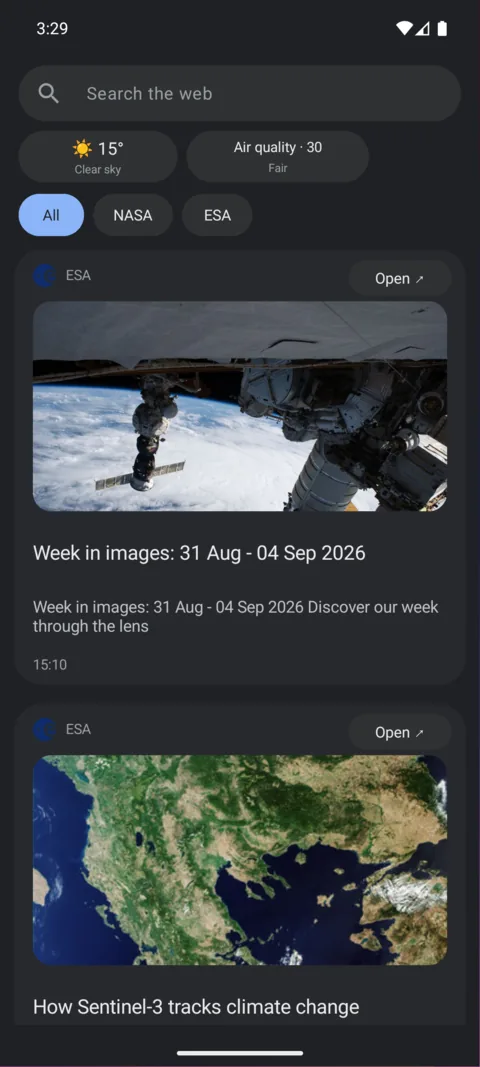
feed_sources, the cards over rss. Both are one template each.Sources#
source picks the list:
"rss": the articles from the feeds the reader configured. Each entry exposesitem_title,item_link,item_image,item_favicon,item_feed_idand the rest; the full list is under live data."feed_sources": the feeds themselves, withitem_nameanditem_id. This is what a row of filter chips is built from."custom": your own list, given initems.
items holds either literal JSON or a formula that evaluates to JSON:
{
  "type": "repeater",
  "source": "custom",
  "direction": "horizontal",
  "itemWidth": "110",
  "items": "[{\"label\":\"News\",\"id\":\"news\"},{\"label\":\"Sport\",\"id\":\"sport\"}]"
}
Each key of an object becomes item_<key>, so item_label and item_id above. A plain string in the array becomes item_value. Because items may be a formula ("$my_variable$"), a list can also be built at runtime by whatever wrote that variable.
Direction and size#
direction is vertical (the default) or horizontal. A scrolling chip row is a horizontal repeater. The primary axis is rowHeight when vertical and itemWidth when horizontal, and both are evaluated per card, so cards may differ:
$item_image != '' ? 260 : 96$Filtering#
filterFormula runs per entry with the entry's values in scope. Combined with a variable a chip row writes, that is a complete filter UI:
$feed_filter == '' || item_feed_id == feed_filter$Staggering#
Cards can appear one after another rather than all at once: an appear animation whose delay is a formula over item_index. item_is_new is 1 only for a card that was not in the list last time it was drawn, so an entrance can be limited to genuinely new items instead of replaying for everything on every visit.
Keep the total short; a list that takes a second to assemble feels slower than one that was simply there.
Scrub strips#
Setting scrubVariable turns a repeater into a strip you drag along. While the finger moves, the entry underneath it is written into that variable, <name>_active is set to 1, and four values become available to every card's formulas:
| Variable | Meaning |
|---|---|
scrub_pos | Distance of this card from the finger, in cards. 0 is under it. |
scrub_press | 1 while the finger is down, eased. |
scrub_vis | 1 while the strip should be visible. |
scrub_over | 1 for the card under the finger. |
The alphabet scrubber of a list-style launcher is exactly this: a repeater over A-Z whose cards displace horizontally by a falloff over scrub_pos, and a list bound to the same variable through filterLetterVariable.
Cost#
A repeater over a long feed is the most expensive thing on a page. Cap it with maxItems, keep per-card formulas short, and remember that a card's rowHeight formula runs for every card on every measure pass.
Documentation for launcher 0.1.0-alpha Android 12 and later last updated